

Odin3 is a lightweight Windows utility developed for flashing firmware on Samsung Android devices. It allows users to install official stock firmware, custom recovery images, and in some cases custom kernels, making it a popular tool among Android power users and service technicians.
With Odin3, you can manually update your Samsung phone even before an OTA (over-the-air) update is released by your carrier or manufacturer. This is useful for fixing software problems, restoring bricked devices, downgrading firmware, or returning to stock after using custom ROMs.
Odin3 communicates with Samsung devices in Download Mode using Samsung’s proprietary flashing protocol. Once connected, it can write firmware files directly to device partitions.
Common uses include:
⚠️ Flashing always carries risk. Using incorrect firmware or PIT files can permanently damage your device.
Note: Although Odin is sometimes associated with rooting, modern Samsung devices often require additional steps beyond Odin alone to gain root access.
Operating System:
Architecture:
Other Requirements:
Incorrect flashing can lead to hard brick, which may require professional repair.
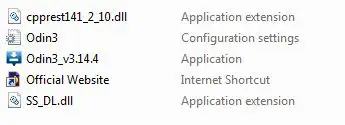
Odin3 is distributed as freeware for Windows and can be used without restrictions for personal or service purposes. No installation is required — simply extract and run the program.
Latest version: Odin3 v3.14.4
(Last officially released version commonly used for modern Samsung devices)
Odin3 is best suited for:
Beginners should carefully follow model-specific guides before using Odin.
Everyone knows Odin is the god in mythology, but Samsung also has a tool name Odin. It is a Utility software for samsung android devices. This application software is saving millions of Samsung devices in the world. Ohh, So it likes a God for Samsung device users. Yes, indeed this is solving device firmware issues and help to manage, maintain, control, recover, upgrade, downgrade, dead-issue or any problem. It gets to device back to normal with full functions. This is the best software to solve firmware issues.
* Odin3 is a firmware flashing software by Samsung for use own Android-based devices
- Make a Full Data Backup everything stored on your device
- Install Samsung USB driver on your windows PC
- Samsung device's battery needs to full or minimum 60% charge
- Enable USB Debugging Mode in your device.
- Download and extract the Odin3 Samsung tool
- Exactly matched firmware file with your device's model number.
- USB Cable for connecting between your device and a computer.
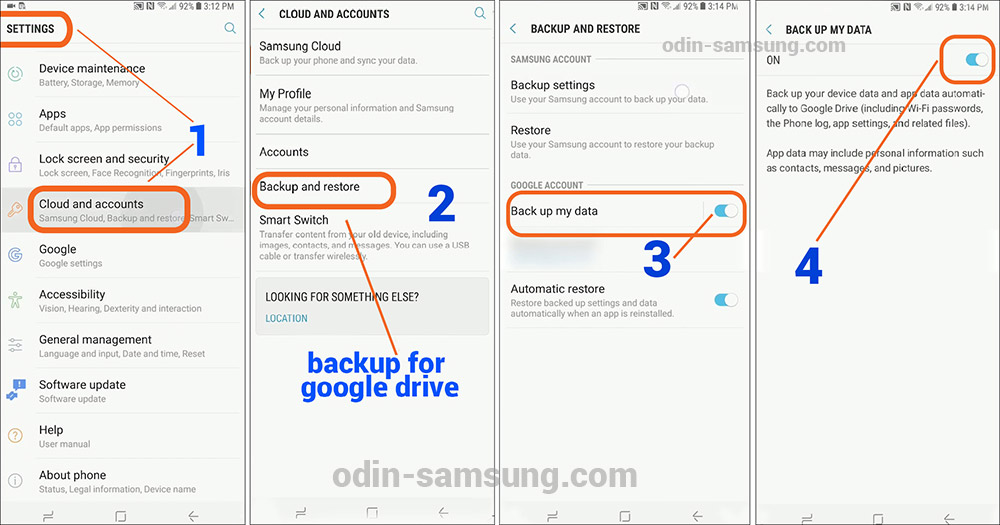
Samsung has own cloud for store users data backups. However Android support google drive for creating and store users data backups. Therefore you can use one of those to store your backup data. Below simple steps, we show you can find how to make it.
First one shows how to make a backup in Samsung cloud

This one shows how to make a google drive backup and restore
USB Debugging Mode need to enable for facilitate a connection between your device and a computer.
Sometimes tech experts told this is not necessary for anything related to flashing kernels and Roms. But we have to do it for safe your phone because something has gone wrong, device unusable. You know It may be very difficult to get back to work the device.
Follow the bellow steps for activate it.

Normally Developer Options are hidden, But you can navigate it through Apps >Settings > About phone, now it has "Build number" then tap the 7 times.

Final step 6 appear popup massage "Allow USB debugging", then tap OK.
Odin mode and the Download Mode are the same things because Odin flashing use it calls Odin mode. Basically, this is used for download and flash ROMs and kernels. It is doing with the press key-combination together and holds 3 to 5 seconds.
Firstly, need to turn off the Samsung phone for boot download mode. To do following these steps

⋙ Bixby key includes Samsung devices: Volume Down + Bixby + Power buttons.
⋙ Home key includes Samsung devices: Volume Down + Home + Power keys.
⋙ No Home or no Bixby keys: Volume Up + Volume Down + Power keys.
The following basic steps will assist to flash stock firmware with using Odin3 flash tool. First, you need to connect your device to the computer. It must enable download mode before connecting the computer.

When the firmware install is finished, Odin3 display PASS!! with green color box.
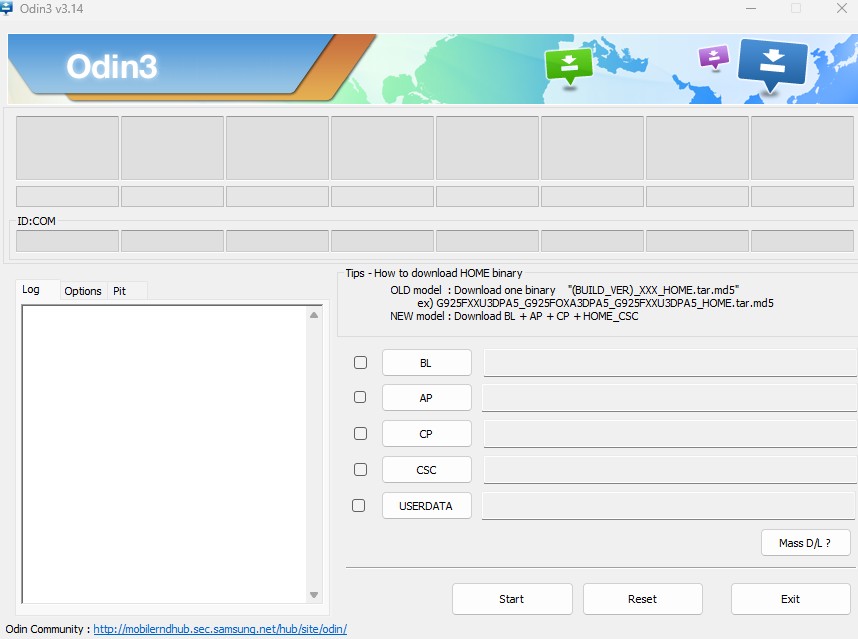
AP - This is mean "Android Processor". Another short firm name "PDA" stands for the same meaning.
CP - It stands for "Core Processor"
CSC - It shows the name as ‘Consumer Software Customization’ or ‘Country Specific Code’. That is used to location base
BP - It mentioned "Bootloader", BP allow to flash the bootloader file with .tar or .tar.md5 extension.
![Odin 3.14.1 [Official] Latest Odin Download Zip File In 2023](https://odin-samsung.com/wp-content/uploads/2019/05/odin3-icon-white-1-32x32.png "Odin 3.14.1 [Official] Latest Odin Download Zip File In 2023")
Version v3.14.1
Developer Samsung
Uploaded May 07, 2020 15:39
Filesize 2.50 MB
Version 3.13.1
Developer Samsung
Uploaded June 30, 2019 16:25
Filesize 3.7 MB
Version v3.09.5
Developer Samsung
Uploaded June 16, 2019 14:37
Filesize 2.0 MB

Version v4.44
Developer Samsung
Uploaded June 13, 2019 13:05
Filesize 175 KB
